

%20(30).png)
A congestion alert adds value only when it flags an abnormal, sustained condition and triggers a specific action from a named owner. Repeated notifications for normal forklift pauses create noise.
Protex AI acts as the site intelligence layer that pairs computer vision flow data with operational systems, giving the signal context for an immediate site response.
This article covers:
- How to tell an operational congestion event from a normal, temporary queue.
- A threshold design method built from baseline, persistence, repeat suppression, severity, and ownership.
- A zone-by-zone example table for aisles, docks, production buffers, and restricted areas.
- A review process for testing and tuning alerts as site conditions change.
When Congestion Alerts Actually Work
Congestion is an abnormal buildup of people, forklifts, pallets, or trailers inside a configured zone, not a brief slowdown. An alert should reach a supervisor only when it maps to an immediate decision, such as rerouting traffic or calling for support.
OSHA's warehousing guidance identifies blocked exit routes and interaction between pedestrians and powered vehicles as warehouse safety concerns. A smart notification helps the right owner respond before a buildup creates a larger site issue.
Congestion vs. Normal Queue
A short line at a dock door during a scheduled unload can be normal. Congestion becomes an operational concern when it blocks an aisle, crossing, or staging lane for a sustained period. Configured computer vision can measure occupancy, dwell, and movement patterns across a defined zone.
Protex analyzes configured zones without facial recognition or individual identification. Each camera view stands alone rather than tracking people or vehicles across cameras. Duration and repeat occurrence help distinguish a normal queue from a pattern that needs a fix.
Building A Threshold Framework - From Baseline To Action
Setting a useful threshold means moving through a specific sequence. Each step builds on the one before it:
- Baseline - The zone's own typical occupancy, dwell, and movement rate.
- Trigger metric - The measure that signals a departure from that baseline.
- Persistence - The minimum time the condition has to hold.
- Repeat suppression - The rule that prevents one ongoing condition from generating unnecessary repeat alerts.
- Severity - Advisory, warning, or critical priority.
- Owner and action - The named person and the documented response.
- Review cadence - The schedule for checking and tuning the setting.
No single occupancy or duration number applies across every zone, shift, or site. A number that works for a wide cross-aisle might misfire in a tight staging lane.
Baseline By Zone And Shift
Normal dwell, occupancy, and movement rate differ by zone and shift, so the baseline should reflect the site's own history. Protex's continuous flow analysis shows movement and presence across configured zones and selected time periods. Teams can use area-use analysis to compare occupancy patterns before setting a threshold.
Persistence Window And Repeat Suppression
Persistence is the minimum time a condition has to hold before it counts as congestion. A brief spike at an intersection may be normal, while a sustained buildup can warrant attention.
Repeat suppression limits unnecessary notifications from the same ongoing event. Teams should validate both settings against the zone's normal pattern before enabling live alerts.
Severity, Owner, And Action
Every threshold needs a named owner and expected response before it goes live. Restricted-zone conditions should follow the site's safety procedure, while a staging buildup might route to a team lead for rerouting. Alerts without an owner or response plan should generally stay off.
Congestion Alert Thresholds By Zone Type - Example Framework
The table below is a design framework, not a set of Protex defaults. Each site should validate thresholds against its own layout, traffic pattern, operating cycle, and safety procedures.
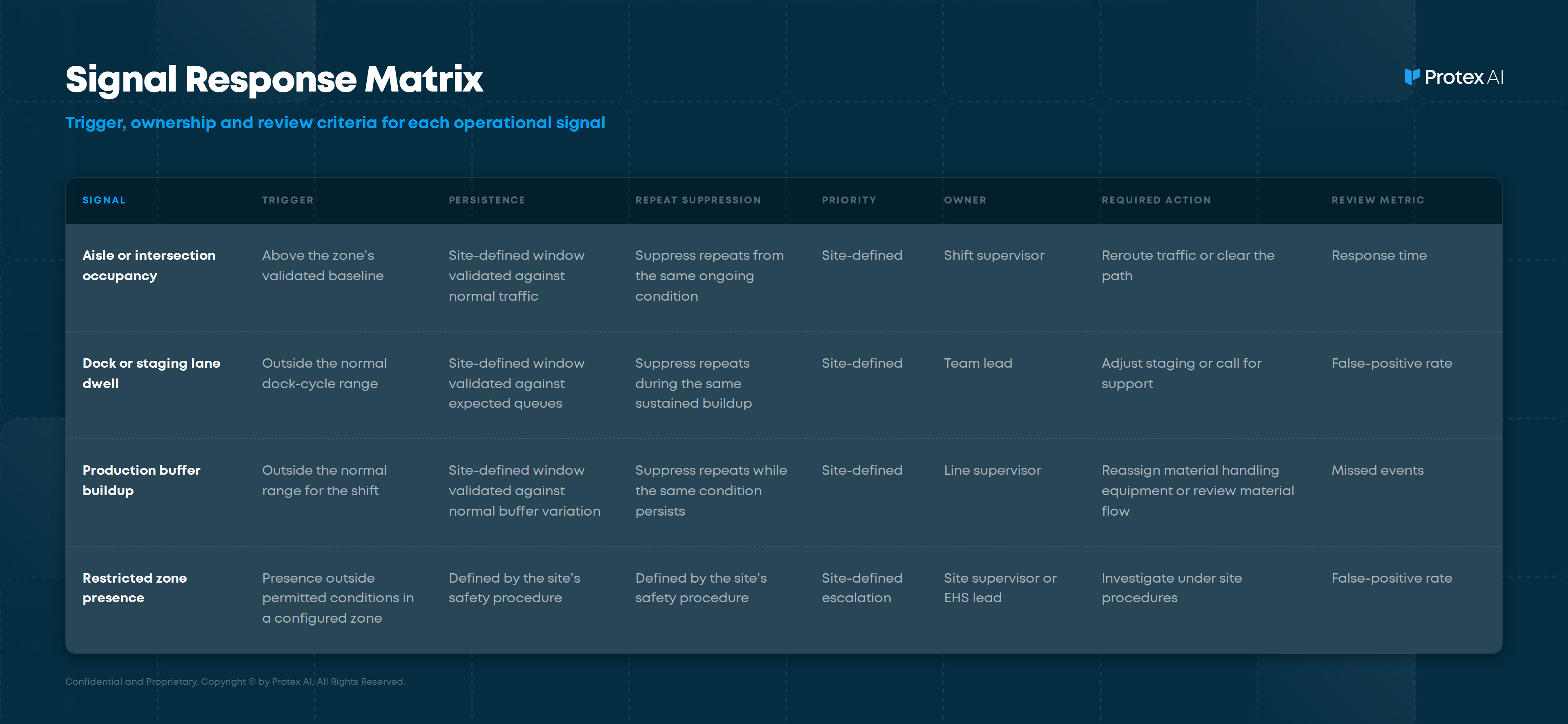
Restricted-zone settings should follow the site's defined safety procedure and risk controls. A staging lane can justify a longer persistence window when short buildups are expected and routes remain open.
Zone geometry and traffic type shape these settings in more depth on Facility Flow and Layout. The workflow shows how teams can set notifications for process conditions outside expected operating ranges.
Avoiding Alert Fatigue Without Losing Critical Alerts
Alert fatigue drops when notification rules filter short-lived and expected conditions before escalation.
Validate Before You Escalate
A practical model requires a minimum duration before a signal escalates. ISA-18 alarm management standards were developed for alarm systems in process industries.
Their principles guide teams toward notifications that are meaningful, prioritized, and actionable. Teams can benefit from these ideas without treating congestion alerts as a formal compliance claim.
Suppressing Expected Congestion
Some buildup is planned, and a team already expects it. Downgrading or suppressing alerts during these windows keeps the notification stream relevant:
- Planned maintenance that takes a lane or aisle out of service.
- Shift handover, when traffic peaks for a predictable period.
- Scheduled replenishment runs that fill staging areas on a set cycle.
Teams should define any suppression exceptions in the alert plan. Pay special attention to safety paths and restricted zones.
From Alert To Action - Using Operational Context
Computer vision shows where and when a configured congestion condition formed. Data from a WMS, MES, or LMS shows if that buildup aligns with workload, labor allocation, order waves, or dock timing. Combining the two provides context for investigating possible causes. It rarely offers absolute proof of causation.
Privacy controls are configured for each deployment. Event context can be reviewed in accordance with the deployment's privacy configuration rather than as records about named people.
What The Notification Should Show
A supervisor reviewing a congestion alert should see:
- The affected zone and its current state.
- The trend against that zone's baseline.
- How long the condition has held.
- Related throughput, dock, or shift context.
- An anonymized clip where relevant.
Turning Context Into A Decision
With that context, a supervisor can reroute traffic, adjust staging, reassign material handling equipment, or investigate a lane that stayed blocked past its normal cycle. Related pattern data appears on Flow Stability.
Testing, Tuning, And Weekly Review
Threshold setting works best as a lifecycle rather than a one-time setup.
- Run the alert in shadow mode during validation. Outcome: a trigger log without live escalation.
- Review false positives and missed events by zone and shift. Outcome: a short list of changes to test.
- Adjust persistence, repeat suppression, or severity. Outcome: a revised threshold ready for another validation pass.
- Promote to live use after reviewing signal quality and the owner response plan. Outcome: a live alert with clear ownership.
A weekly scorecard should track notification count, response time, false-positive rate, missed events, and operational outcomes. Add acknowledged count when the site's workflow records it. Revalidate thresholds after layout, process, staffing, or volume changes. Reporting & Integrations can support a shared review across sites and shifts.
Configuring Congestion Workflows
Teams planning these alert workflows can use site intelligence for operations to connect physical site signals with operational context and reporting. Start with one high-traffic zone, validate the configuration in shadow mode, and expand after the notifications prove actionable.
Common Questions About Congestion Alert Thresholds
How do you set a warehouse congestion threshold?
Start with the zone's own historical occupancy and dwell pattern. Then define the trigger, persistence, repeat-suppression rule, owner, and response. Another facility's threshold should not be treated as a default.
What causes congestion-alert fatigue?
Fatigue often comes from thresholds set too tight, missing persistence windows, or weak repeat suppression. One ongoing condition can otherwise notify the same owner again and again.
Should congestion thresholds change by shift?
Often. Workload and traffic patterns change across shifts, so teams should validate the baseline and persistence settings for each operating pattern.
What metrics show if a congestion alert works?
Track response time, false-positive rate, missed events, and the operational outcome after intervention. Add acknowledged rate when the site's workflow records it.
Put The Framework To Work
A useful congestion alert starts with the site, not a generic threshold. Establish the zone baseline, define how long an abnormal condition must persist, assign an owner, and validate the rule in shadow mode before enabling live notifications. Track response time, false positives, missed events, and the operational outcome so teams can see if the intervention actually improves flow.
Protex AI connects physical site signals with operational context from systems such as WMS, MES, and LMS, helping teams move from “congestion happened here” to evidence-backed action. Talk to Protex AI about designing and validating a congestion-alert workflow for one of your high-traffic zones.
Check Out Our Industry
Leading Blog Content
EHSQ industry insights, 3rd Gen EHSQ AI-powered technology opinions & company updates.
.jpg)
.jpg)
.jpg)