

.jpg)
Edge processing means analyzing video locally, near the camera or on-site network, before deciding what data leaves the facility. In industrial safety AI, the local processing layer matters because it affects privacy review, alert speed, bandwidth load, and deployment scale.
Technical buyers hear the phrase in vendor demos all the time. The harder question is what physically happens between a CCTV camera capturing a frame and a safety alert appearing in a dashboard.
What you'll find in this article:
- What edge processing means and how it differs from edge computing
- How an event moves from CCTV stream to safety insight
- What stays local, what leaves the site, and why that matters for privacy
- How edge deployments affect latency, bandwidth, scaling, and vendor evaluation
What Is Edge Processing?
Edge processing is the active data handling layer that runs close to the source device. After a camera captures a frame, this layer runs inference, applies privacy controls, and decides what should leave the site.
It sits inside the broader concept of edge computing. Edge computing describes a distributed architecture. Edge processing is the work happening inside that architecture. It dictates what data moves, when it moves, and in what form.
For readers newer to computer vision, that is the branch of AI that interprets frames and images before the system decides what matters. In an industrial site, that might mean detecting PPE issues, vehicle-to-person proximity, area-control events, or unsafe behaviors.
Cloud-Only vs. Edge-First Hybrid Processing
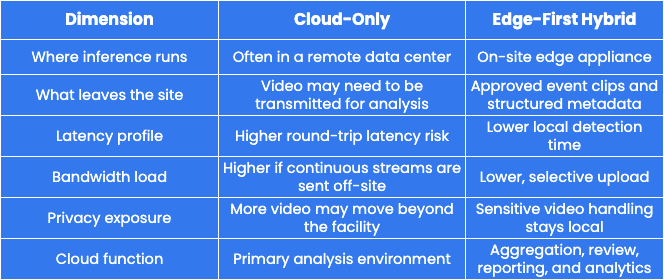
For many industrial safety workloads, workplace safety software needs edge-first architecture: local analysis for sensitive video, cloud access for event review, and enough flexibility to fit existing site infrastructure. Exact data movement still depends on vendor architecture, customer configuration, and site policy.
What Edge Processing Actually Does
Computer vision pipelines running on edge hardware can deliver fast alerts for PPE compliance, area control, vehicle interactions, and unsafe behavior while keeping sensitive video handling on-site.
Here's what happens when a worker enters a restricted zone, and Protex AI detects that movement.
- CCTV stream ingestion - The edge appliance receives the live CCTV stream over the local network, so raw video becomes available for analysis without leaving the facility.
- On-device inference - The appliance runs the AI model locally on each frame. Inference means applying a trained model to new data in production, so the system can detect or dismiss an event close to the source.
- Anonymization and blurring - In a Protex AI edge deployment, configured privacy controls are applied locally before approved event data leaves the site. Raw, identifiable footage does not need to move beyond the edge device for AI processing.
- Encryption - The approved event clip and associated metadata are encrypted on-device before outbound transfer.
- Selective upload - Depending on customer policy and configuration, short privacy-treated clips and structured metadata can travel to the cloud dashboard. Protex AI filters the live stream locally rather than moving continuous raw footage to the cloud for analysis.
- Cloud dashboard aggregation - The dashboard receives approved event data for review, reporting, and analysis. Protex Intelligence can then turn event data into plain-language answers, charts, reports, heatmaps, and multi-site views for EHS, Operations, and IT teams.
Why Privacy Comes First in This Architecture
Sensitive video handling should be controlled where data is created. Protex AI uses local processing to reduce exposure before approved event data leaves the site, but privacy still depends on configuration, access controls, retention policy, worker communications, and governance.
Keeping sensitive video handling close to the source can support a stronger security posture and GDPR-aligned data minimization when configured correctly. The NIST Cybersecurity Framework 2.0 gives IT teams a useful lens for evaluating controls such as data security, platform security, monitoring, and infrastructure resilience.
Protex AI's enterprise privacy and security controls show how edge processing, access control, encryption, and deployment governance work together during implementation.
What Stays Local
- Raw CCTV footage - analyzed by the edge appliance instead of being streamed to the cloud for processing
- Identifiable worker imagery - handled locally before any approved event clip is prepared for upload
- Continuous live stream - processed in real time on the on-site edge device and not stored in full by Protex AI. Short event clips may be generated when a configured risk is detected
- Customer CCTV or VMS retention - governed by the customer's site policy and existing infrastructure
Because sensitive handling stays on-site, the architecture can reduce employee concerns about raw worker video leaving the facility. That transparency helps Environment, Health, and Safety (EHS), IT, and site leaders explain how the system works before deployment.
What Leaves the Site
- Privacy-treated event clips, such as blurred clips, are encrypted before transmission
- Structured metadata, such as event type, timestamp, zone, and camera ID
- Derived event data used for cloud dashboards, trend analysis, and multi-site reporting
Privacy Questions IT Should Ask Vendors
A practical way to evaluate an edge AI vendor's privacy claims is to compare what stays on-site with what leaves. Ask for written answers to these questions:
- Does raw footage leave the facility for AI processing?
- Where do blurring, anonymization, and encryption happen?
- What metadata leaves the site, and does it include biometric data?
- How are retention settings, access controls, and audit logs managed?
- What documentation supports DPIAs, data residency reviews, and security assessments?
Regulated environments add another layer because data residency and CCTV rules can affect where video is processed, what evidence is retained, and how worker privacy reviews are documented.
Latency and Bandwidth - Why Local Processing Changes Both
Edge computing processes data near its source. That proximity can lower latency and make real-time monitoring more practical.
Fewer Hops, Faster Decisions
Cloud-routed processing can send video from the camera to the local network, across the WAN, into a cloud environment, and back to the site before action happens. Each hop can add time. Edge processing shortens that chain because the system detects and classifies events locally.
For safety applications, lower latency means alerts can arrive fast enough to support immediate intervention. Alert delivery still depends on network configuration, notification logic, and workflow design.
Bandwidth Load Across a Camera Estate
Keeping raw video off the cloud significantly reduces network load. That matters in bandwidth-limited environments such as remote facilities, older industrial sites, and large warehouses with many cameras.
Continuous video streaming from dozens of cameras creates a substantial, ongoing burden. Selective upload of privacy-treated event clips replaces that with a smaller data flow.
Lower bandwidth requirements can help existing site infrastructure handle the load without major network upgrades.
Protex AI integrates with existing CCTV infrastructure and states compatibility with 90% of cameras from leading providers, so many customers can start without replacing their camera estate. CCTV integrations also determine how easily an edge AI system can connect to existing cameras, VMS infrastructure, and site network design.
Scaling Across Sites Without Scaling the Problem
Local processing supports repeatable deployment across multiple sites. As more locations come online, each site performs heavy video processing locally instead of sending continuous video to a central cloud environment. For multi-site EHS and IT leaders, this model also supports site comparison without centralizing continuous raw footage.
Each site runs its own edge appliance, keeping processing local and the configuration repeatable. Here is what that looks like across a growing camera estate:
- Consistent site configuration - a new facility can adopt the same deployment pattern without a full network redesign
- Remote management and model updates - approved updates keep locations aligned without constant on-site intervention
- Lower cloud video transport burden - heavy processing stays local, so multi-site expansion can avoid the bandwidth and egress profile of cloud-only video streaming
- Flexible appliance sizing - larger rack-mounted industrial PCs can support multi-camera processing and centralized edge hubs, matching the hardware to each site's camera count, rules, and performance needs
Edge-first architecture reduces a major cloud-only cost driver, but scaling still depends on camera count, event volume, retention settings, hardware sizing, support model, and deployment design. IT teams should also review supplier dependencies, access controls, update processes, and failure modes before a multi-site rollout.
Camera Compatibility and Flexible Scaling
Protex AI ingests standard CCTV streams without demanding proprietary camera hardware in most environments. Scaling up usually means adding cameras to an existing appliance, resizing the appliance, or deploying additional units based on site design.
This approach helps teams avoid complex cloud capacity planning and high video egress exposure. It also keeps the deployment conversation grounded in practical IT questions: camera compatibility, network topology, appliance sizing, rule coverage, and support requirements.
For technical buyers, enterprise-ready privacy architecture matters because rollout success depends on security review, camera compatibility, low network impact, and repeatable deployment across sites.
Misconceptions Technical Buyers Should Avoid
Technical evaluations often stall on assumptions that do not hold up under scrutiny. Address these common misconceptions before they derail the assessment.
- "Edge just means on-premise storage."
Local processing is an active compute and inference layer, not a storage location. Raw footage remaining on-site is a result of the architecture rather than its defining feature.
- "Cloud AI is more accurate because it has more compute."
Training workflows often rely on centralized compute, but production inference does not always need that same setup. Accuracy depends on model quality, training data, camera placement, lighting, inference configuration, false-positive rates, false-negative rates, and monitoring. Model performance still needs site acceptance testing.
- "Edge can't handle multiple cameras without expensive hardware."
Larger edge systems can support multi-camera processing and centralized edge hubs. The right appliance specification depends on camera count, frame rate, rules, event volume, and site conditions.
- "Sending privacy-treated clips removes all risk."
Blurring, anonymization, and encryption reduce exposure, but they do not remove every privacy obligation. Review the controls, retention settings, access model, and local policy before deployment.
If residency rules are part of your evaluation, the On-Prem, On-Policy article linked above explains the policy layer that sits above this workflow.
Edge Processing FAQ For IT And Safety Teams
Before approving a pilot, IT and safety teams need more than a high-level architecture diagram. These questions clarify how edge processing works in practice and where vendor claims need evidence.
What is edge processing in AI?
Edge processing in AI means running inference on a local device rather than routing every frame to a remote server. In industrial computer vision, the camera feed gets analyzed on-site, privacy controls can be applied locally, and only approved event data moves onward.
Does raw CCTV footage leave the site?
In a Protex AI edge deployment, raw CCTV is processed locally for AI analysis rather than streamed continuously to the cloud by Protex AI. Privacy-treated event clips and structured metadata can be sent to the cloud dashboard for review, depending on configuration and customer policy. Customer CCTV or VMS retention remains governed by the customer's own systems and policies.
Why does local processing reduce latency?
Local processing cuts the number of network hops needed for event detection. That lowers transmission time compared with cloud-routed alternatives. Alert speed still depends on network setup, notification rules, and response workflows.
Can edge AI scale across many cameras and sites?
Yes, when the deployment is sized correctly. Because processing runs locally on each edge appliance, adding cameras or sites does not require continuous raw video streaming to the cloud. Each rollout still needs hardware sizing, network review, and configuration planning.
What should IT test during an edge AI pilot?
IT should test camera compatibility, event accuracy, latency, bandwidth load, privacy controls, access logs, retention settings, alert delivery, and failure modes. EHS and Operations should also validate that detected events create usable coaching, reporting, and investigation workflows.
Safer AI Starts With Smarter Data Flow
Edge processing gives industrial teams a practical way to use computer vision without sending continuous raw CCTV footage to the cloud. Analysis happens close to the source, which can support faster alerts, lower bandwidth demand, and stronger privacy controls when the deployment is configured and governed correctly.
To see how this architecture applies to a specific camera estate and site footprint, contact us and the Protex AI team can walk through what a rollout looks like in practice.
Check Out Our Industry
Leading Blog Content
EHSQ industry insights, 3rd Gen EHSQ AI-powered technology opinions & company updates.
.jpg)
.avif)
.avif)